
Choosing the right drawing board depends on the user's age, the desired display technology, and the intended environment. LCD tablets offer digital convenience with pressure sensitivity, while magnetic boards provide a traditional, screen-free experience with vibrant colors.
This guide compares seven distinct options, ranging from compact 8.5-inch travel pads to large 16-inch LED displays. Whether you need a single unit for office notes or a multi-pack for siblings, these picks highlight specific features to help you find the best fit for your creative needs.
Our pick: TECJOE 4 Pack 8.5 Inch LCD Writing Tablet. The four-pack of 8.5-inch tablets ensures each child has their own mess-free drawing surface.
Our 3 picks for different needs

Geokay 16 Inch Rechargeable LED Drawing Board
The 16-inch rechargeable LED board offers ample space for detailed artwork and glowing effects.
Read the details
TECJOE 4 Pack 8.5 Inch LCD Writing Tablet

The four-pack of 8.5-inch tablets ensures each child has their own mess-free drawing surface.
Read the details
Magnetic Drawing Board Blue 15.2 Inch
The large magnetic board with four color zones provides a durable, battery-free option for young kids.
Read the detailsAll products, in detail
TECJOE 4 Pack 8.5 Inch LCD Writing Tablet
This four-pack set provides individual 8.5-inch LCD tablets for siblings or shared use. Each unit features a pressure-sensitive screen that supports over 100,000 uses and includes a lock function to save artwork. The ultra-slim design weighs only 3.5 ounces per pad, making it ideal for travel.
It is a practical choice for families needing multiple mess-free drawing surfaces for children aged three to eight.
- Includes four 8.5-inch LCD tablets with styluses
- Pressure-sensitive screen supports 100,000+ uses

TQU 4 Pack 8.5 Inch LCD Writing Tablet
This colorful four-pack uses flexible liquid crystal technology for a brighter display compared to standard LCD pads. The pressure-sensitive technology allows users to vary line thickness based on stylus pressure. Each tablet includes an erase button and a lock switch for saving content. The set comes in blue, light blue, green, and pink, offering distinct options for different children or creative zones.
- Four-pack in blue, light blue, green, and pink
- Pressure-sensitive technology for variable line thickness
Geokay 16 Inch Rechargeable LED Drawing Board
This large 16-inch board features a rechargeable LED display with nine lighting modes for glowing artwork. The surface is made of 3mm thickened hardened acrylic, which is more resistant to cracking than thinner alternatives. It includes a built-in stand for tabletop or upright display. The kit comes with seven markers, tracing papers, and a USB-C cable, making it a complete creative station for older children and teens.
- 16-inch display with nine LED light modes
- 3mm thickened hardened acrylic surface

KOKODI 10 Inch LCD Writing Tablet
This single 10-inch tablet offers a larger canvas than standard 8.5-inch models. It uses pressure-sensitive LCD technology that is safe for long-term use without glare. The device is powered by a replaceable button battery with a life of three to six months. The durable plastic case has rounded corners for shock resistance, and the unit weighs 150 grams, making it a portable option for travel and home use.
- 10-inch pressure-sensitive LCD screen
- Replaceable button battery with 3-6 month life
Magnetic Drawing Board Blue 15.2 Inch
This large magnetic doodle board features a 9.2 by 6.5 inch drawing screen within a 15.2 by 11.8 inch frame. It displays four vivid colors in distinct zones, providing visual variety for young artists. The board is made from eco-friendly ABS plastic with rounded edges for safety.
It includes a magnetic pen and four stamps, making it a screen-free option for preschoolers to practice shapes and writing.
- 9.2 x 6.5 inch drawing screen with 4 color zones
- Includes magnetic pen and four stamps

Mafiti 8.5 Inch LCD Writing Tablet Black
This black 8.5-inch tablet is designed for both kids and office use. It features an updated version with thicker writing lines for easier viewing. The stylus doubles as a kick-stand to display messages, and it docks securely on the board. Powered by a replaceable CR2016 battery, it supports over 100,000 writes and erases.
Its ultra-lightweight and thin profile makes it a versatile tool for notes and doodles.
- Stylus functions as a kick-stand for display
- Uses replaceable CR2016 3.0V battery
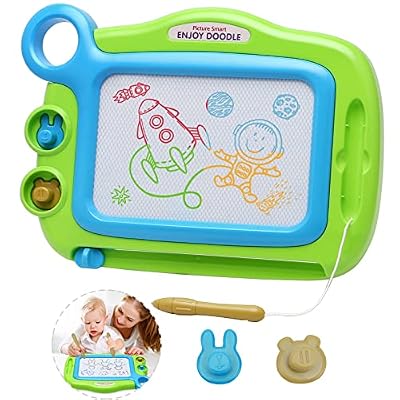
ALISKAGZE Magnetic Drawing Board Green
This green magnetic board is designed for toddlers aged three to five. It features four distinct color zones in red, blue, green, and yellow to make doodles pop. The board is crafted from non-toxic ABS plastic with rounded edges and includes an attached stylus to prevent loss.
It serves as a screen-free travel companion for car rides or restaurants, promoting fine motor skills through drawing and stamping.
- Four distinct color zones for vibrant display
- Attached stylus pen to prevent loss
Head-to-Head Comparisons
TECJOE vs TQU: 8.5 Inch LCD Pack Options
Both the TECJOE and TQU products offer four 8.5-inch LCD tablets, but they differ in their specific technological emphasis. The TECJOE pack highlights its ultra-slim 3.5-ounce weight per pad, making it particularly suitable for travel and backpacks. The TQU pack emphasizes its flexible liquid crystal technology, claiming a brighter and clearer display than most standard LCDs.
If portability is your primary concern, the TECJOE's lightweight design is a key factor. If display brightness is the priority, the TQU's flexible technology may appeal more. Both include styluses and lock functions, so the choice often comes down to which specific hardware feature you value more.
Geokay LED vs KOKODI LCD: Display Technology
The Geokay 16-inch board and the KOKODI 10-inch tablet represent two different approaches to digital drawing. The Geokay uses a rechargeable LED display with nine light modes, allowing for glowing neon artwork that can serve as a night light. It is larger and includes a built-in stand for display.
The KOKODI uses a standard pressure-sensitive LCD screen that is safer for eyes without glare and is powered by a replaceable button battery. The Geokay is better for users who want a large, glowing display for creative expression, while the KOKODI is a more traditional, portable option for standard drawing and writing tasks.
Magnetic Board Sizes and Colors
Both the Blue and Green magnetic boards offer screen-free drawing with four color zones, but they differ in size and target age. The Blue board has a larger frame of 15.2 by 11.8 inches with a 9.2 by 6.5 inch screen, making it suitable for two kids or larger drawings.
It is marketed for ages three to seven. The Green board is specifically designed for toddlers aged three to five and features an attached stylus to prevent loss. If you need a larger surface for older preschoolers, the Blue board is the better fit. If you are looking for a compact, toddler-specific toy with a secure pen, the Green board is the appropriate choice.
Buying Guide
LCD vs Magnetic Technology
LCD tablets use electronic screens that respond to pressure, allowing for variable line thickness and easy one-click erasing. They are powered by batteries and offer a digital feel. Magnetic boards use a physical mechanism with a magnetic pen to move particles, creating colors in distinct zones.
They require no batteries and are often considered more durable for very young children. Consider whether you prefer the digital precision of LCD or the tactile, screen-free nature of magnetic boards. For more options, see magnetic drawing boards.
Screen Size and Portability
Screen size directly impacts the type of artwork possible. 8.5-inch tablets are compact and lightweight, ideal for travel, car rides, and small desks. 10-inch tablets offer a larger canvas for more detailed work while remaining portable. 16-inch boards provide ample space for elaborate designs and can be displayed upright.
If portability is key, choose the smaller 8.5-inch models. If you want a stationary creative station, the larger 16-inch or large magnetic boards are better suited for home or classroom use.
Power Source and Maintenance
LCD tablets require batteries, either replaceable button cells or rechargeable units. Check the battery type and life; some last 3-6 months, while others are rechargeable via USB. Magnetic boards do not require any power source, eliminating battery replacement costs and waste. LED boards are typically rechargeable.
If you want a zero-maintenance option, magnetic boards are the simplest. If you prefer the features of an LCD, ensure you are comfortable with the specific battery maintenance required by the model.
Age Appropriateness and Safety
Different boards are designed for different age groups. Magnetic boards with rounded edges and attached pens are often recommended for toddlers aged three to five. LCD tablets are generally suitable for children aged three to eight and older. Always check the recommended age range and safety features, such as screw-secured battery compartments.
For younger children, screen-free options like children's magnetic drawing boards may be safer and more engaging. Ensure the product fits the developmental stage of the user.
Frequently Asked Questions
Are LCD writing tablets safe for children's eyes?
Most LCD writing tablets use pressure-sensitive screens that do not emit blue light or glare, making them comfortable for long use. However, individual sensitivity varies. Magnetic boards are a completely screen-free alternative that eliminates any display-related concerns entirely.
How long do the batteries last in these boards?
Battery life varies by model. Some LCD tablets use replaceable button batteries that last three to six months. Others are rechargeable via USB. Magnetic boards do not require batteries at all, making them a maintenance-free option for long-term use.
Can I use these boards for office notes?
Yes, several models like the Mafiti 8.5-inch tablet are designed for both kids and office use. They are lightweight, portable, and feature a kick-stand to display messages. They are ideal for quick notes, reminders, or doodles in a professional setting.
What is the difference between a 4-pack and a single unit?
A 4-pack provides multiple tablets, which is ideal for families with siblings or for sharing in a classroom. Each child can have their own device, preventing conflicts. A single unit is better for individual use or if you only need one drawing surface for travel or home.
This article is part of our complete guide Office Products — browse all our comparisons and buying guides.
Last update on 2026-11-18 / Affiliate links / Images from Amazon Product Advertising API