
Choosing the right DVI cable depends on the distance between your computer and display, as well as the resolution and refresh rate you need. DVI cables are a reliable way to connect digital video signals, but not all cables are created equal. Some are designed for short, tight spaces, while others offer the length and bandwidth for high-end gaming or professional setups.
This guide compares six DVI cables based on their documented features, including length, resolution support, and build quality. Whether you are setting up a home office, a gaming rig, or a conference room, these options cover a range of needs. Check the live product cards for current prices before making your decision.
Our 3 picks for different needs
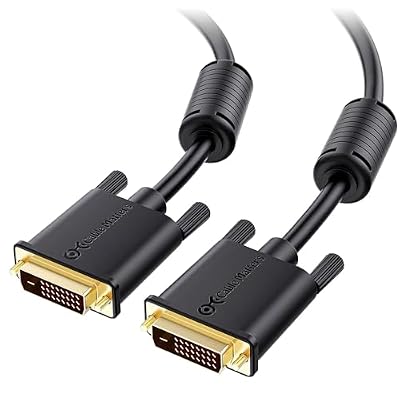
Cable Matters 10-Foot Dual Link DVI Cable
The 10-foot length and Dual Link support make it ideal for connecting a PC to a monitor across a room.
Read the details
6-Foot DVI-D 5-Pack Cable
The 5-pack format is practical for users who need multiple identical cables for a conference room or multi-monitor desk.
Read the details
Thzzhnno 3.3-Foot DVI-D Cable
The 3.3-foot length minimizes cable clutter while still supporting high resolutions up to 2560x1600.
Read the detailsAll products, in detail

URELEGAN 6-Foot DVI-D Cable
This 6-foot cable connects DVI-equipped devices to displays with 24+1 or 24+5 pin ports. It supports resolutions up to 1920×1200 and 1080p at 60Hz. The design includes gold-plated connectors and dual ferrite cores for noise suppression. It is a straightforward choice for standard desktop or laptop connections where a mid-length cable is needed for desk placement.
- Supports 1080p at 60Hz and 1920×1200 resolutions
- Features gold-plated connectors and dual ferrite cores
Cable Matters 10-Foot Dual Link DVI Cable
A 10-foot Dual Link DVI-D cable designed for high-bandwidth applications like video editing and gaming. It supports resolutions up to 2560×1600 and 144Hz refresh rates. The connectors feature molded strain relief and finger-tightened screws for a secure fit. This length is ideal for connecting a computer to a monitor or projector across a room.
- 10-foot length with Dual Link support for 2560×1600
- Includes molded strain relief and finger-tightened screws
6-Foot DVI-D 5-Pack Cable
This 5-pack of 6-foot DVI-D cables offers a bulk option for offices or multi-monitor setups. Each cable supports 1080p at 60Hz and is compatible with DVI-I devices. The connectors are designed for easy installation in tight spaces. Buying in a pack is practical for users who need multiple identical connections for a conference room or workstation.
- Sold as a 5-pack of 6-foot cables
- Compatible with both DVI-D and DVI-I devices
Thzzhnno 3.3-Foot DVI-D Cable
A short 3.3-foot DVI-D cable that supports high resolutions up to 2560×1600. It features gold-plated connectors and braided durability for stable signal transmission. The compact length is suitable for tight desk spaces where the computer and monitor are close together. It is a good fit for users who need high resolution without excess cable clutter.
- 3.3-foot length with 2560×1600 resolution support
- Features gold-plated connectors and braided construction

Critin 3.3-Foot DVI-D Dual Link Cable
This 1-meter DVI-D Dual Link cable is designed for high-resolution digital video connections. It supports up to 2560×1600 and 1080p for clear video output. The gold-plated connectors are built for corrosion resistance and long-term reliability. It is a plug-and-play option for gaming systems and professional displays that require a short, high-bandwidth connection.
- 1-meter length with Dual Link support
- Gold-plated connectors for corrosion resistance
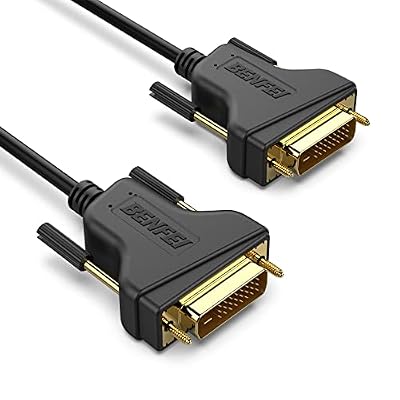
BENFEI 1.8-Meter DVI-D Cable
A 1.8-meter DVI-D Dual Link cable that supports resolutions up to 2560×1600 and 120Hz refresh rates. It features molded strain relief and grip treads for easy handling. The bare copper conductors and foil shielding help maintain signal integrity. This is a solid choice for users who need a slightly longer cable than the 3.3-foot options but not as long as 10 feet.
- 1.8-meter length with 120Hz support at 1440p
- Features grip treads and molded strain relief
Head-to-Head Comparisons
Cable Matters 10-Foot vs BENFEI 1.8-Meter: Length and Bandwidth
Both the Cable Matters and BENFEI cables support high resolutions up to 2560×1600, but they differ significantly in length. The Cable Matters cable is 10 feet long, making it suitable for connecting a computer to a display across a room. The BENFEI cable is 1.8 meters, or about 6 feet, which is better for standard desk setups.
Both feature Dual Link support and gold-plated connectors. If you need to reach a monitor on a different piece of furniture, the Cable Matters cable is the better fit. If your setup is compact, the BENFEI cable provides the necessary bandwidth without excess length.
Thzzhnno vs Critin: Short Cable Options
The Thzzhnno and Critin cables are both 3.3 feet long and support resolutions up to 2560×1600. They are nearly identical in their core specifications, making them interchangeable for most users. The Thzzhnno cable emphasizes braided durability and gold-plated connectors, while the Critin cable highlights corrosion resistance and Dual Link support.
Both are plug-and-play and do not require drivers. The choice between them may come down to personal preference for the connector design or current availability. Neither cable offers a distinct advantage in resolution or length, so buyers can choose based on which product is currently in stock.
URELEGAN Single vs 5-Pack: Single vs Bulk
The URELEGAN cable is sold individually, while the 5-pack option provides five identical 6-foot cables. Both support 1080p at 60Hz and feature gold-plated connectors. The URELEGAN cable is a good choice for a single monitor or projector connection. The 5-pack is ideal for users who need multiple cables, such as for a conference room or a multi-monitor setup.
If you only need one cable, the URELEGAN option is sufficient. If you need several, the 5-pack offers a convenient bulk solution.
Buying Guide
Check Your Resolution and Refresh Rate
Before buying a DVI cable, verify the maximum resolution and refresh rate your monitor or projector supports. DVI cables vary in their bandwidth capabilities. Some support 1080p at 60Hz, while others handle 2560×1600 at 120Hz or 144Hz. If you are using a high-end gaming monitor, ensure the cable you choose supports the specific resolution and refresh rate you plan to use.
This prevents compatibility issues and ensures you get the best possible image quality.
Measure the Distance
The length of the cable is a critical factor in your setup. Measure the distance between your computer and display, adding a few extra feet for slack. A cable that is too short will not reach, while one that is too long can create clutter and potential tripping hazards.
For tight desk spaces, a 3.3-foot cable is often sufficient. For setups where the computer and monitor are on different pieces of furniture, a 10-foot cable may be necessary.
Consider Connector Build Quality
Look for cables with gold-plated connectors and robust shielding. Gold plating helps prevent corrosion and ensures a reliable connection over time. Foil and braid shielding help reduce electromagnetic interference, which can cause static or noise in the video signal. Cables with molded strain relief and finger-tightened screws are also more durable and easier to handle.
These features contribute to a longer-lasting and more stable connection.
Determine If You Need Multiple Cables
If you are setting up a multi-monitor workstation or a conference room, you may need more than one cable. Buying a 5-pack can be a convenient option in this case. It ensures that all your cables are identical, which can simplify troubleshooting and replacement. If you only need one cable, buying individually is more straightforward.
Consider your specific use case when deciding between a single cable and a bulk pack.
Frequently Asked Questions
Does a DVI cable carry audio?
No, DVI cables do not support audio output. They are designed for digital video transmission only. If you need to transmit both video and audio, you will need a separate audio cable or a different type of video cable that supports audio, such as HDMI.
What is the difference between Single Link and Dual Link DVI?
Dual Link DVI cables have more pins and can support higher resolutions and refresh rates than Single Link cables. Dual Link is necessary for resolutions above 1920×1200, such as 2560×1600. If you are using a high-resolution monitor, ensure your cable and graphics card support Dual Link.
Can I use a DVI cable with an HDMI monitor?
DVI and HDMI are different connectors, so you cannot plug a DVI cable directly into an HDMI port. However, you can use a DVI to HDMI adapter if your graphics card has a DVI output and your monitor has an HDMI input. Note that DVI does not carry audio, so you will need a separate audio connection.
How long can a DVI cable be before signal loss occurs?
Signal integrity can degrade over long distances, but the cables in this guide are designed to maintain signal quality at their specified lengths. For most home and office setups, cables up to 10 feet should work without issues. If you need a cable longer than 10 feet, consider using an active cable or a different technology like DisplayPort.
This article is part of our complete guide Electronics — browse all our comparisons and buying guides.
Last update on 2026-11-18 / Affiliate links / Images from Amazon Product Advertising API