
Choosing a modem router combo depends on your cable provider, internet speed plan, and the number of devices in your home. These eight options range from DOCSIS 3.0 models for standard plans to DOCSIS 3.1 units capable of handling multi-gigabit speeds.
Each device combines a cable modem with a built-in router, eliminating the need for separate equipment. Consider the WiFi standard, coverage area, and provider compatibility to find a unit that matches your specific needs and home layout.
Our 3 picks for different needs

ARRIS Surfboard G34

The ARRIS Surfboard G34 supports DOCSIS 3.1 speeds up to 2.5 Gbps, making it suitable for users on the fastest available cable plans.
Read the details
Motorola MG8702
The Motorola MG8702 includes a smart app for easy setup, guest network management, and parental controls, simplifying network administration.
Read the details
Motorola MG7550 (Renewed)
The Motorola MG7550 features a vertical design that minimizes shelf space and improves cooling, ideal for small desks or shelves.
Read the detailsAll products, in detail

NETGEAR Nighthawk CAX30
This NETGEAR Nighthawk combo pairs a DOCSIS 3.1 modem with a WiFi 6 router, supporting cable plans up to 1Gbps on Spectrum and Cox. It offers AX2700 speeds and covers up to 2,000 sq ft, making it suitable for households with multiple devices. The unit includes four Gigabit Ethernet ports and WPA3 security, providing a modern foundation for high-speed cable internet.
- DOCSIS 3.1 modem with WiFi 6 AX2700 router
- Compatible with Xfinity, Spectrum, and Cox

NETGEAR Nighthawk C7000 (Renewed)
A renewed version of the NETGEAR Nighthawk C7000, this combo uses DOCSIS 3.0 technology with 24×8 channel bonding. It is designed for cable plans up to 800 Mbps and provides AC1900 WiFi speeds. The device includes four Gigabit Ethernet ports and one USB port, offering a reliable option for users who do not require the latest WiFi 6 standard.
- DOCSIS 3.0 with 24×8 channel bonding
- AC1900 WiFi with 1800 sq ft coverage
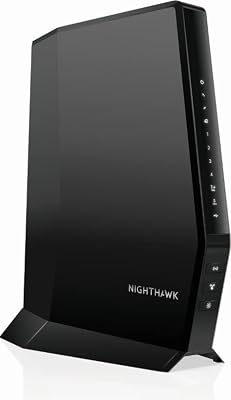
NETGEAR Nighthawk CAX30-100NAR (Renewed)
This renewed NETGEAR Nighthawk model features a DOCSIS 3.1 modem with 32×8 channel bonding and a WiFi 6 router. It supports cable speeds up to 2Gbps and covers up to 2,500 sq ft. The unit includes four Gigabit Ethernet ports with port aggregation and a USB 3.0 port, making it a strong choice for users seeking higher throughput and wired flexibility.
- DOCSIS 3.1 with 32×8 channel bonding
- WiFi 6 AX2700 with 2,500 sq ft coverage
ARRIS Surfboard G34
The ARRIS Surfboard G34 combines a DOCSIS 3.1 modem with a WiFi 6 router, supporting cable plans up to 2.5 Gbps. It features AX3000 WiFi speeds and a compact design with simple LED indicators. The device includes four Gigabit Ethernet ports and is not compatible with fiber, DSL, or satellite services, making it a straightforward option for high-speed cable users.
- DOCSIS 3.1 modem with WiFi 6 AX3000 router
- Supports cable plans up to 2.5 Gbps
Motorola MG8702
The Motorola MG8702 is a DOCSIS 3.1 combo with an AC3200 WiFi router, featuring Intelligent Power Boost and AnyBeam beamforming. It is approved for Comcast Xfinity, Cox, and Charter Spectrum. The device includes a smart app for setup and management, along with two years of free expert support, providing a user-friendly experience for managing home networks.
- DOCSIS 3.1 modem with AC3200 WiFi router
- Includes smart app and 2-year support

NETGEAR Nighthawk C7000
This NETGEAR Nighthawk combo uses a DOCSIS 3.0 modem with a WiFi 5 router, supporting cable plans up to 800 Mbps. It offers AC1900 speeds and covers a wide area with Beamforming+ technology. The unit includes four Gigabit Ethernet ports and one USB 2.0 port, providing a solid option for users on standard cable plans who prefer WiFi 5.
- DOCSIS 3.0 modem with WiFi 5 AC1900 router
- Certified for Xfinity and Cox

NETGEAR Nighthawk CAX30 (Renewed)
This renewed NETGEAR Nighthawk CAX30 features a DOCSIS 3.1 modem and a WiFi 6 router with AX2700 speeds. It is compatible with major cable providers including Xfinity, Spectrum, and Cox. The device is designed for gigabit wireless internet and offers a compact form factor, making it a suitable choice for users seeking a renewed unit with modern connectivity standards.
- DOCSIS 3.1 modem with WiFi 6 AX2700 router
- Compatible with Xfinity, Spectrum, and Cox
Motorola MG7550 (Renewed)
This renewed Motorola MG7550 combines a 16×4 DOCSIS 3.0 modem with an AC1900 WiFi router. It is recommended for cable speeds up to 375 Mbps and is approved by multiple providers including Comcast and Cox. The vertical design conserves shelf space and improves cooling, while the integrated firewall helps secure the network against denial of service attacks.
- 16×4 DOCSIS 3.0 modem with AC1900 WiFi
- Recommended for speeds up to 375 Mbps
Head-to-Head Comparisons
NETGEAR CAX30 vs C7000: DOCSIS 3.1 vs 3.0
The NETGEAR CAX30 uses DOCSIS 3.1 technology, supporting cable plans up to 1Gbps on Spectrum and Cox, while the C7000 uses DOCSIS 3.0 for plans up to 800 Mbps. The CAX30 includes WiFi 6 with AX2700 speeds, whereas the C7000 offers WiFi 5 with AC1900 speeds.
If you are on a gigabit plan, the CAX30 is the appropriate choice. For standard plans, the C7000 provides sufficient performance with a lower technology tier.
ARRIS G34 vs Motorola MG8702: Speed vs Features
The ARRIS G34 supports DOCSIS 3.1 speeds up to 2.5 Gbps and features WiFi 6 AX3000, focusing on raw throughput. The Motorola MG8702 also uses DOCSIS 3.1 but includes an AC3200 WiFi router with Intelligent Power Boost and a comprehensive smart app. The ARRIS unit is better for users prioritizing maximum speed, while the Motorola is suited for those who value app-based management and beamforming features.
NETGEAR C7000 vs Motorola MG7550: Coverage vs Design
The NETGEAR C7000 offers 1800 sq ft of wireless coverage and 24×8 channel bonding, making it suitable for larger homes. The Motorola MG7550 is recommended for speeds up to 375 Mbps and features a vertical design that saves shelf space. The NETGEAR unit provides broader coverage and higher speed support, while the Motorola unit is more compact and designed for smaller spaces or lower-speed plans.
Buying Guide
Check Provider Compatibility
Before purchasing, verify that the modem is approved by your cable provider. Some models are certified for specific providers like Xfinity, Spectrum, or Cox, while others may not be compatible with certain plans. Check your provider's website for a list of approved devices to ensure smooth activation and avoid service interruptions.
Match DOCSIS to Your Plan
DOCSIS 3.0 modems are suitable for plans up to 800 Mbps, while DOCSIS 3.1 modems support multi-gigabit speeds. If you are on a standard cable plan, a DOCSIS 3.0 model may be sufficient. For gigabit or multi-gig plans, a DOCSIS 3.1 modem is necessary to unlock the full speed of your service.
Assess WiFi Coverage Needs
Consider the size of your home and the number of devices when choosing a WiFi standard. WiFi 6 offers better performance in dense environments, while WiFi 5 is adequate for most households. If you have a large home or many devices, look for models with higher coverage areas and more robust antennas to ensure consistent connectivity throughout your space.
Consider Wired Connections
If you have devices that require a stable, low-latency connection, such as gaming consoles or desktops, check the number of Ethernet ports. Most combos include four Gigabit Ethernet ports, but some offer additional features like port aggregation or USB ports for storage. Ensure the unit has enough ports for your wired devices to avoid the need for additional switches.
Frequently Asked Questions
Can I use these combos with fiber internet?
No, these devices are designed for cable internet service. They are not compatible with fiber, DSL, or satellite services. Check your provider's requirements to ensure you have the correct type of modem for your specific internet technology.
What is the difference between DOCSIS 3.0 and 3.1?
DOCSIS 3.0 supports speeds up to 800 Mbps, while DOCSIS 3.1 supports multi-gigabit speeds. If you are on a standard plan, DOCSIS 3.0 is sufficient. For gigabit or faster plans, you need a DOCSIS 3.1 modem to achieve the full speed of your service.
Do I need to activate the modem with my provider?
Yes, ISP activation is required after setup. You must register the modem's MAC address with your cable provider to activate the service. This process is usually quick and can be done online or by contacting your provider's support team.
Are renewed products a good option?
Renewed products can be a good option if they are in good condition and come with a warranty. They offer the same features as new units but may have minor cosmetic wear. Check the seller's return policy and warranty terms before purchasing a renewed device.
This article is part of our complete guide Electronics — browse all our comparisons and buying guides.
Last update on 2026-11-18 / Affiliate links / Images from Amazon Product Advertising API