
Selecting a PC game headset involves balancing audio fidelity, connectivity options, and physical comfort. Buyers must decide whether they prioritize the freedom of wireless transmission or the consistent signal of a wired connection. Driver specifications describe the hardware, but their dimensions alone do not establish which headset sounds better. Compare the listed audio features and software requirements before treating any model as an upgrade.
Comfort features, such as memory foam cushions and lightweight frames, determine how long a headset can be worn during extended sessions. Additionally, microphone quality varies, with some models featuring boom arms for precise voice capture and others using built-in beamforming mics for convenience. Compatibility is another critical factor, as some headsets are designed for specific platforms or require software for advanced features like surround sound.
By evaluating these core attributes, shoppers can identify a headset that aligns with their specific gaming habits and setup preferences.
Our 3 picks for different needs
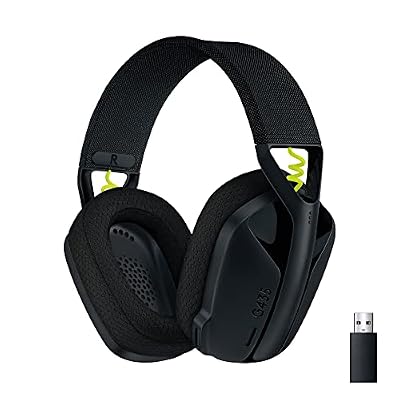
The Logitech G435 offers dual connectivity via Lightspeed and Bluetooth for use across PC, Mac, and mobile devices.
Read the details

The HyperX Cloud III features angled 53mm drivers and a noise-cancelling mic for focused, wired gaming sessions.
Read the details
The SteelSeries Arctis Nova 1 provides 360-degree spatial audio and a lightweight ComfortMAX design for immersive play.
Read the detailsAll products, in detail

The HyperX Cloud III features angled 53mm drivers and a noise-cancelling mic for focused, wired gaming sessions.

The Logitech G435 offers dual connectivity via Lightspeed and Bluetooth for use across PC, Mac, and mobile devices.
The SteelSeries Arctis Nova 1 provides 360-degree spatial audio and a lightweight ComfortMAX design for immersive play.


Head-to-Head Comparisons
Logitech G435 vs Logitech G733: Connectivity and Weight
The Logitech G435 and G733 offer different reasons to choose wireless. The G435 lists Lightspeed wireless and Bluetooth connectivity, making it worth considering if your setup includes a PC and a Bluetooth-equipped phone. These two connection options do not establish that both devices can play audio simultaneously; check the switching procedure before buying for calls during a game. Its listed weight is 165 g, or 5.8 oz.
The G733 instead stands out here for a stated range of 20 meters, up to 29 hours of battery life, dual-zone RGB lighting and PRO-G drivers. Its listed battery duration exceeds the G435’s 18-hour specification, though actual runtime depends on use. Choose the G435 for its listed connection options and low weight, or consider the G733 if longer stated runtime and lighting customization matter more.
Neither specification set establishes a measured sound-quality winner.
HyperX Cloud III vs Cloud II: Microphone Features and Surround Sound
Both HyperX models list 53mm drivers, so driver diameter alone gives little reason to choose one over the other. The Cloud III uses angled drivers and lists a noise-cancelling microphone with a mesh filter and LED mute indicator. Its title also lists USB-C, USB-A and 3.5mm connectivity, useful details to compare with the ports on your setup. The Cloud II lists hardware-driven virtual 7.1 surround sound, memory foam ear pads and an aluminum frame.
These are documented differences, not proof that either microphone or driver sounds better in practice. The Cloud III deserves a closer look if its listed connections and visible mute indicator match your workflow. The Cloud II is an alternative for buyers specifically considering its virtual-surround implementation. Check platform and software requirements separately: a wired connection does not establish that every spatial-audio feature works without software on every device.
SteelSeries Arctis Nova 1 vs Razer BlackShark V2 X: Spatial Audio and Isolation
The SteelSeries Arctis Nova 1 and Razer BlackShark V2 X approach immersion differently. The Arctis Nova 1 features 360-degree spatial audio compatible with Tempest 3D Audio for PS5 and Microsoft Spatial, along with a Pro-grade Parametric EQ for customization. It uses a ComfortMAX system with rotating earcups and AirWeave memory cushions. The Razer BlackShark V2 X focuses on passive noise cancellation with sturdy closed earcups intended to provide a physical seal against external sound, and it offers software-enabled 7.1 surround sound on Windows 10 64-bit.
It uses Triforce Titanium 50mm drivers. The Arctis Nova 1 is worth considering for users who want immersive spatial audio and extensive sound customization, while the Razer BlackShark V2 X suits those who prioritize physical sound isolation and a specific driver design for clarity.
Buying Guide
Wired vs Wireless Connectivity
Start with the devices you actually use. A headset that suits a desktop may need a different connection when moved to a console or phone. The G435 lists Lightspeed and Bluetooth, while the G733 lists Lightspeed wireless transmission; compare those stated connection methods with your devices rather than assuming interchangeable support. Wired models such as the Cloud III and BlackShark V2 X avoid the routine of charging a wireless headset.
Their audio and microphone connections still need to match the available ports or adapters. If you want to hear a phone call and a game at the same time, explicitly verify simultaneous-audio support: two connection methods alone do not promise mixing. For wireless use, consider listed range and battery duration alongside where you charge the headset. For wired use, check cable routing and the distance between your seat and the connection point.
Driver Size and Audio Tuning
Use driver size as one specification, not a ranking system. The HyperX Cloud III and Cloud II list 53mm drivers; the Razer BlackShark V2 X and Logitech G432 list 50mm drivers. Those numbers do not establish a bass, clarity or positional-audio advantage between the products. The Cloud III describes angled drivers tuned by HyperX, while the G733 lists PRO-G drivers.
Compare these descriptions with the adjustments available in your preferred setup. The Arctis Nova 1 lists a parametric EQ, which may appeal to buyers who want to adjust their sound profile; check the software and platform requirements for that feature. Before paying for an audio feature, establish whether it is useful in your actual games and supported by your device.
Listening preferences vary, and a return policy can matter when a specification sheet cannot answer a fit or sound-preference question.
Comfort and Fit for Long Sessions
Comfort needs a personal check because head shape, glasses and preferred clamping pressure differ. Memory foam is listed for the Cloud III, Cloud II and BlackShark V2 X, but that material alone does not guarantee cooler ears or a pressure-free fit. The G435’s stated 165 g weight is useful for comparing how much hardware you will wear. The Arctis Nova 1 lists height-adjusting, rotating earcups, AirWeave memory cushions and a stretchy band, giving you specific fit adjustments to investigate.
Look at whether the earcups surround your ears comfortably and whether the headband adjusts far enough for you. If you wear glasses, check pressure where the frame meets the cushions. During an initial fitting, move your head as you would while playing and verify that the microphone remains usefully positioned. Comfort claims in a listing should not replace that practical fit check.
Microphone Quality and Features
Compare microphone controls separately from broad claims about voice quality. The Logitech G432 lists a 6mm boom microphone that mutes when flipped up. The HyperX Cloud III lists a noise-cancelling microphone, mesh filter and LED mute indicator; those details do not establish the same flip-to-mute action. The G435 uses built-in dual beamforming microphones rather than a microphone arm. That design may suit someone who wants less hardware in front of their face, while a movable microphone can suit a different positioning preference.
If your room is noisy, look for voice samples recorded in a setting similar to yours before assuming that a noise-cancelling description guarantees clean chat. Confirm how muting works and how you can tell that it is active. For frequent team calls, these everyday controls can be as relevant as the microphone’s stated size.
Frequently Asked Questions
Do I need surround sound for PC gaming?
Surround sound can enhance immersion and help with positional audio, but it is not strictly necessary. Some headsets, like the Razer BlackShark V2 X and HyperX Cloud II, offer virtual 7.1 surround sound, which can be enabled via software or hardware. Others, like the SteelSeries Arctis Nova 1, provide 360-degree spatial audio. If you play games that benefit from directional audio, such as shooters, surround sound can be advantageous.
However, if you prefer a simpler setup or play games that do not rely heavily on positional audio, stereo sound may be sufficient. Check if the headset's surround sound feature is compatible with your operating system and games.
How important is battery life for wireless headsets?
Battery life is a key consideration for wireless headsets, as it determines how long you can play without recharging. The Logitech G733 offers up to 29 hours of battery life, while the Logitech G435 provides 18 hours. If you play for extended sessions, a longer battery life is beneficial. However, if you typically play in shorter bursts, a shorter battery life may be acceptable.
Consider your typical play habits and whether you have access to a charging station during breaks. Some headsets may also offer fast charging, which can be useful if you need a quick top-up.
Can I use a PC headset with a console?
Many PC headsets are compatible with consoles, but it depends on the specific model and connection type. For example, the Razer BlackShark V2 X works with PC, PS4, PS5, and Switch via a 3.5mm audio jack. The HyperX Cloud III is compatible with PC, PS5, and Xbox Series X|S. The Logitech G435 supports PC, Mac, smartphones, PlayStation, and Nintendo Switch.
Check the compatibility list for each headset to ensure it works with your specific console. Some headsets may require an adapter or specific settings to function optimally on consoles.
What is the difference between passive and active noise cancellation?
Passive noise cancellation, as seen in the Razer BlackShark V2 X, relies on physical design, such as closed earcups and cushions, to block out external noise. It does not require power or electronics. Active noise cancellation uses microphones and electronics to generate sound waves that cancel out ambient noise. While active noise cancellation can be more effective in noisy environments, it may drain battery life.
Passive noise cancellation is simpler and does not affect battery life, making it a good choice for wired headsets or those who prefer a straightforward design.
This article is part of our complete guide Electronics — browse all our comparisons and buying guides.
Last update on 2026-11-18 / Affiliate links / Images from Amazon Product Advertising API