
Choosing the right laptop computer network adapter depends on whether you need a stable wired connection or a wireless upgrade. Wired Ethernet adapters are generally preferred for gaming and large file transfers due to their lower latency and consistent speeds.
On the other hand, USB Wi-Fi adapters are useful for adding wireless capability to desktops or upgrading older laptops to newer Wi-Fi standards. This comparison covers eight options, ranging from simple USB 2.0 converters to multi-port hubs and Wi-Fi 6 dongles, to help you match the device to your specific connectivity needs.
Our pick: TP-Link UE306 USB to Ethernet Adapter. The TP-Link UE306 is explicitly compatible with Nintendo Switch, providing a stable wired connection for online gaming.
Our 3 picks for different needs

TP-Link UE306 USB to Ethernet Adapter

The TP-Link UE306 is explicitly compatible with Nintendo Switch, providing a stable wired connection for online gaming.
Read the details
Acer USB-C Hub with Ethernet and 3x USB 3.0
The Acer hub offers three USB 3.0 ports alongside Ethernet, allowing you to connect a keyboard, mouse, and network simultaneously.
Read the details
Nineplus Wi-Fi 6 AX1800 USB Adapter
The Nineplus AX1800 adapter provides Wi-Fi 6 speeds for users who want to upgrade their wireless performance without a wired connection.
Read the detailsAll products, in detail
TP-Link UE306 USB to Ethernet Adapter
The TP-Link UE306 is a compact USB 3.0 to RJ45 adapter that adds a wired gigabit port to laptops, tablets, and Nintendo Switch consoles. It features a foldable USB connector and a small form factor that fits easily into a pocket or bag. This model is ideal for users who need a reliable wired connection for gaming or file transfers without the bulk of a full hub.
- Supports Nintendo Switch for wired gaming
- Features a foldable USB connector for portability
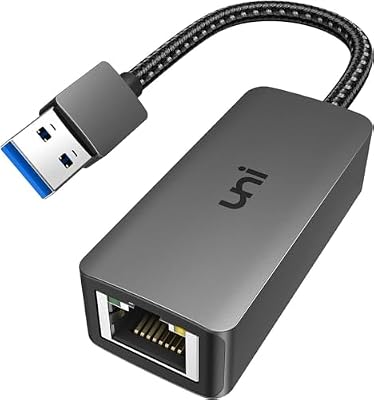
uni USB 3.0 to Gigabit Ethernet Adapter
The uni adapter uses an RTL8153 chip to provide stable gigabit Ethernet speeds over a USB 3.0 connection. It includes a nylon braided cable and an aluminum case designed for heat dissipation, which helps maintain performance during extended use. This model is compatible with Windows, macOS, and Linux, though it explicitly does not support Nintendo Switch.
It is a good fit for desktop or laptop users who prioritize a durable build and stable signal transport for video conferencing or streaming.
- Uses an RTL8153 intelligent chip for transmission
- Features a nylon braided cable and aluminum case
Acer USB-C Hub with Ethernet and 3x USB 3.0
The Acer hub expands a single USB-C or USB-A port into a gigabit Ethernet port and three USB 3.0 ports. It is designed for users who need to connect multiple peripherals, such as keyboards and mice, alongside a wired network connection. The aluminum alloy build supports heat dissipation and durability for office or travel use.
Note that the three USB-A ports share a total 5Gbps bandwidth, and the hub does not include HDMI or PD charging capabilities.
- Includes 1x Gigabit Ethernet and 3x USB 3.0 ports
- Dual USB-A and USB-C connector design

UGREEN USB 3.0 to Ethernet Adapter
This UGREEN adapter provides a simple, compact solution for adding a 1000Mbps wired connection to devices with a USB-A port. It is compatible with Windows, macOS, Chrome OS, and Nintendo Switch, including the OLED model. The small-size design makes it easy to carry in a briefcase or pocket, suitable for business travelers who need a reliable backup to Wi-Fi.
It requires no drivers on most modern operating systems, allowing for instant setup.
- Compatible with Nintendo Switch and Switch OLED
- Compact design suitable for travel

Nineplus AC1300 Dual-Band USB Wi-Fi Adapter
The Nineplus AC1300 adapter is a wireless solution for desktops or laptops that lack a built-in Wi-Fi card or need an upgrade to dual-band speeds. It features two 5dBi high-gain antennas to enhance signal reception and transmission over longer distances. This model supports Windows systems but does not support macOS, Linux, or Chromebooks.
It is a practical choice for users who need to extend their wireless coverage in areas with poor signal strength.
- Features two 5dBi high-gain antennas
- Supports Windows 11/10/8/7/XP only

Mobi Lock USB 2.0 to Ethernet Adapter
The Mobi Lock adapter is a basic USB 2.0 to RJ45 converter designed for users who need a simple wired connection without gigabit speeds. It is bus-powered and requires no additional power source, making it a lightweight option for travel. This model is compatible with Windows and macOS but does not work with Nintendo Switch or devices using 8-pin connectors.
- USB 2.0 interface with 100Mbps capability
- Bus-powered with over-current protection
Nineplus Wi-Fi 6 AX1800 USB Adapter
This Nineplus adapter upgrades a computer to the Wi-Fi 6 standard, offering dual-band speeds up to 1201Mbps on 5GHz and 574Mbps on 2.4GHz. It features a nano design to avoid blocking adjacent USB ports and includes a high-gain antenna for stable connections. The device supports WPA3 security protocols and is compatible with Windows 11 and 10.
It is a suitable choice for users who want to leverage a modern Wi-Fi 6 router without replacing their entire computer.
- Supports Wi-Fi 6 (802.11ax) standard
- Nano design to save USB port space

UGREEN 5-in-1 USB Hub with Ethernet
The UGREEN 5-in-1 hub combines a gigabit Ethernet port with three USB 3.0 ports and a USB-C power supply port. This configuration allows users to connect a wired network and multiple peripherals while powering high-power devices like external hard drives. It is plug-and-play on Windows, macOS, and Chrome OS.
This model is ideal for users who need a single cable to manage their network and accessories, reducing desk clutter.
- Includes a USB-C power supply port for peripherals
- 5-in-1 design with Gigabit Ethernet
Head-to-Head Comparisons
TP-Link UE306 vs UGREEN USB 3.0 Adapter
Both the TP-Link UE306 and the UGREEN USB 3.0 adapter are compact, plug-and-play solutions for adding a wired gigabit connection. The TP-Link model features a foldable USB connector, which is a distinct physical advantage for users who frequently pack their gear into tight spaces. The UGREEN adapter is also compact and explicitly lists compatibility with the Nintendo Switch OLED, whereas the TP-Link listing mentions standard Switch support.
Both are suitable for general laptop use, but the TP-Link's foldable design may offer better protection for the connector during travel.
Acer USB-C Hub vs UGREEN 5-in-1 Hub
The Acer and UGREEN hubs both provide a gigabit Ethernet port and three USB 3.0 ports, but they differ in their power and connector configurations. The UGREEN hub includes a dedicated USB-C power supply port, which is useful for powering high-power peripherals like external hard drives.
The Acer hub features a dual USB-A/C connector design, allowing it to connect to devices with either port type. If you need to power an external drive, the UGREEN model is the better fit, while the Acer's dual connector offers more flexibility in how you plug it into your host device.
Nineplus AC1300 vs Nineplus Wi-Fi 6 Adapter
Both Nineplus adapters are wireless solutions, but they target different Wi-Fi generations. The AC1300 model supports the older 802.11ac standard with dual 5dBi antennas, while the AX1800 model supports the newer Wi-Fi 6 standard. The Wi-Fi 6 adapter is smaller, featuring a nano design that avoids blocking adjacent ports, whereas the AC1300 has larger external antennas for signal range.
If your router supports Wi-Fi 6, the AX1800 is the logical choice for future-proofing. If you need maximum physical antenna gain for a distant router, the AC1300's larger antennas may be preferable.
Buying Guide
Wired vs Wireless Connectivity
Decide if you need a physical cable or a wireless signal. Wired Ethernet adapters are generally more stable and have lower latency, making them ideal for online gaming and video conferencing. Wireless USB adapters are better for mobility and for adding Wi-Fi to devices that lack it.
If you are near a router and need speed, choose wired. If you need to move around or your device has no Wi-Fi card, choose wireless.
USB Port Type and Speed
Check your laptop's available ports. Most modern laptops have USB-C, while older models may only have USB-A. Ensure the adapter matches your port type. For wired adapters, USB 3.0 is required to reach gigabit speeds; USB 2.0 adapters are limited to 100Mbps. If you have a USB-C port, you can use a USB-C hub or a USB-C to USB-A adapter to connect a standard USB-A Ethernet dongle.
Operating System Compatibility
Verify that the adapter supports your operating system. Most adapters work with Windows and macOS, but some have specific limitations. For example, the Nineplus Wi-Fi adapters do not support macOS or Linux. The uni Ethernet adapter is not compatible with Nintendo Switch, while the TP-Link and UGREEN models are.
Always check the compatibility list in the product description to ensure the driver will install correctly on your specific OS version.
Hub vs Single Port Adapter
Consider if you need to connect other devices. A single-port adapter only adds a network connection. A hub, like the Acer or UGREEN models, adds Ethernet plus multiple USB ports for keyboards, mice, or drives. If your desk is cluttered or your laptop has few ports, a hub is more efficient.
If you only need a network connection and have plenty of free USB ports, a single-port adapter is simpler and often more compact.
Frequently Asked Questions
Can I use a USB Ethernet adapter with a Nintendo Switch?
Some adapters are compatible, but not all. However, the uni adapter and Mobi Lock adapter explicitly state they are not compatible. Always check the specific product description for Switch support.
Do I need to install drivers for these adapters?
Most modern adapters are plug-and-play on Windows 10/11, macOS, and Chrome OS. However, some models may require drivers for older systems like Windows 7 or Linux.
What is the difference between USB 2.0 and USB 3.0 Ethernet adapters?
USB 3.0 adapters support gigabit (1000Mbps) speeds, while USB 2.0 adapters are typically limited to 100Mbps. If you have a high-speed internet connection, a USB 3.0 adapter is necessary to utilize the full bandwidth. USB 2.0 adapters are sufficient for basic browsing or older, slower network connections.
Will a USB Wi-Fi adapter work with my Mac?
It depends on the specific model. The Nineplus AC1300 and Wi-Fi 6 adapters listed here do not support macOS. If you use a Mac, you should look for adapters that explicitly list macOS compatibility in their features, as many USB Wi-Fi dongles are Windows-only.
This article is part of our complete guide Electronics — browse all our comparisons and buying guides.
Last update on 2026-11-18 / Affiliate links / Images from Amazon Product Advertising API